Statements
see what’s new with our products
A Message From Our Team
Happy October! 🎃 Fall into our latest batch of updates designed to make managing your financial institution even smoother. This month, we're excited to highlight new features for the Banno Support app case queue, seamless browser-based key generation for developers, the launch of our new Origination Pilot & Beta Hub for lending and deposits, and so much more. Dive in below to see what's new!

Suspicious and Fraudulent Event Labeling
We have some new fraud prevention features hitting Banno and Treasury admin apps very soon.
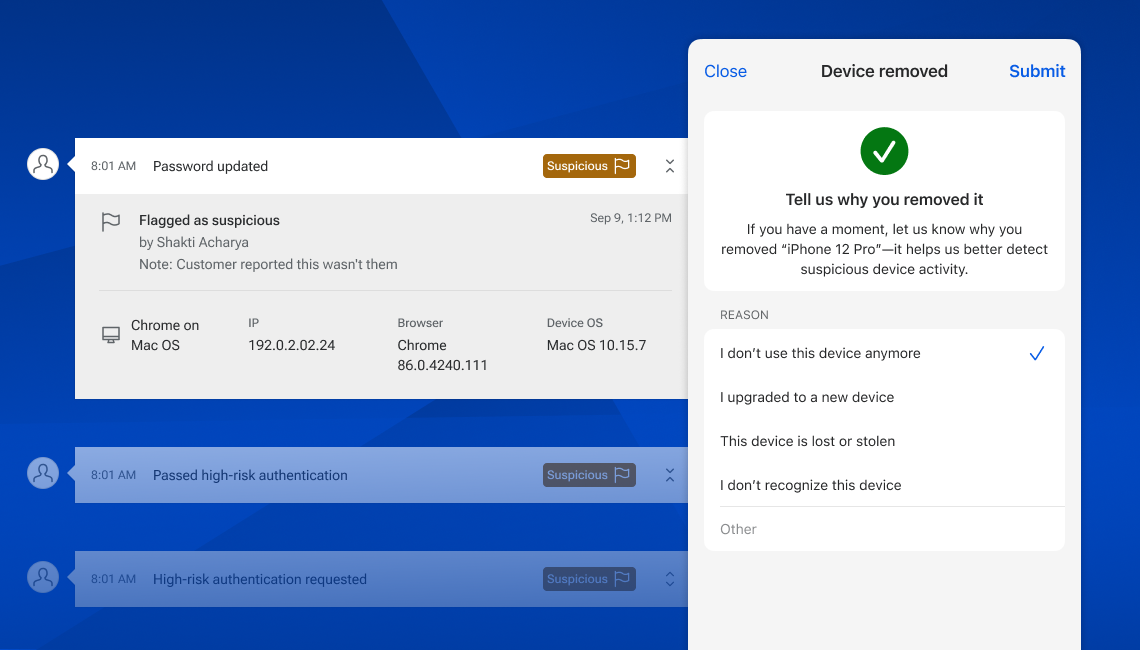
Flagging History Events
Within Banno People and Identity, your designated staff will soon be able to mark history events as suspicious or fraudulent as well as add notes to aid in any ongoing investigations or when reviewing past events. We’ve developed three related permissions – View labels, Manage suspicious labels, and Manage fraudulent labels – to let your administrators grant access to the ideal staff members.
The ability to label history events is still in progress, and we’re targeting a late April delivery.
Device Removal Reasons
In Banno People and Identity, as well as within Online and Mobile, we’ll be asking for reasons when a device is removed. This will be optional on the consumer apps (for all accountholders) and required when removing devices from Banno People or Identity. Learning why devices are removed will help us identify risky patterns of activity, so we can be better equipped to prevent fraud in the future.
We’re targeting to begin asking end users for these reasons in Mobile 3.33, and this will likely hit Online and Admin apps around the same time – no support case required.