Statements
see what’s new with our products
A Message From Our Team
Happy October! 🎃 Fall into our latest batch of updates designed to make managing your financial institution even smoother. This month, we're excited to highlight new features for the Banno Support app case queue, seamless browser-based key generation for developers, the launch of our new Origination Pilot & Beta Hub for lending and deposits, and so much more. Dive in below to see what's new!

Jack Henry Insights: Live Now!
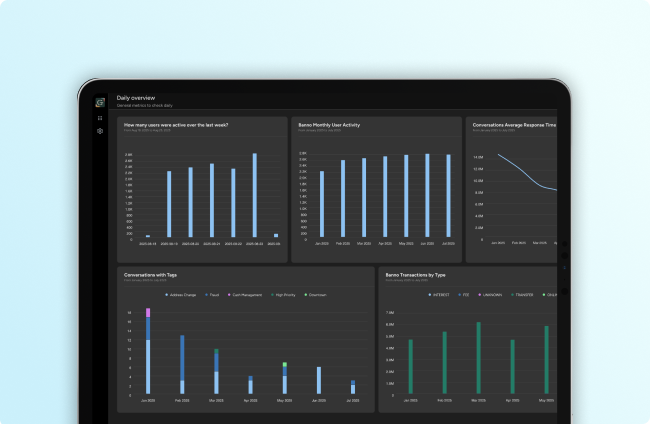
One of our go-forward Jack Henry Platform offerings, Insights is the modern reporting and visualization tool that lets your team create, edit, and maintain custom queries as wanted or leverage several out-of-the-box report templates to help you hit the ground running – today!
Out of the gate, you’ll find four crucial datasets supported for Insights:
- Activity and App Usage
- Bill Pay
- Remote Deposit Capture
- Conversations
We’re already working on additional datasets, so stay tuned for updates as we add others.
Allowing Access
Editor’s note: This section was edited on September 11, 2026 for additional clarity.
In Banno Admin, there are two separate groups of permissions that control access to Insights: Banno Groups and JH Platform Groups
Updating the Banno Groups
For the Insights icon to appear in the More menu (•••), an authorized administrator will first need to assign the Manage Insights permission to the existing Banno Groups of your users:
- Click the More menu (•••) and select Users & Groups.
- Click Group list, click Banno Groups tab, and select (or create) a group.
- Scroll to the Platform section, select the
Manage Insightscheckbox, and click Save (or Create, if making a new group).
If applicaple, repeat the steps above for each group that should have access to Insights.
Updating the JH Platform Group
To save your admins as much time as possible, our support team created a JH Platform Group, named Insights, on your behalf and prepopulated it with the required View Insights permission.
To grant access to your team, an authorized administrator must open Banno Admin and assign individuals to the Insights group:
- Click the More menu (•••) and select Users & Groups.
- Click Group list, click the JH Platform Groups tab, and search/select the Insights group.
Note: You will then see the “Insights” title at the top of the screen, and the Permissions tab should be active. - Click the Users tab, click Add user, search the individual/s you want to join the group, and click Add next to their name/s.
Important: With new features, additional permissions may become available that your administrators can add to the Insights group. Please reference the Insights Permissions documentation on the Knowledge Base for details on the available permissions.
Accessing Insights
You can access Insights through Jack Henry Platform or through Banno Admin.
To open the reporting through Jack Henry Platform:
- Open Banno Admin.
- Click the Platform icon.
- In the left-hand navigation of the Platform app, click the Insights icon (the bar graph).
Note: For this path, Insights will open in the same browser tab.
To open the reporting through Banno Admin:
- Click the More menu (•••).
- Select Insights.
Note: For this path, Insights will open in a new browser tab.
Taking Your First Steps with Insights
Once you’ve accessed the tool, the best way to start using it is by leveraging the pre-built reports along the right side of the landing page. These can immediately provide valuable intel and can help you understand how the reports are built.
To get more familiar with this powerful reporting tool, please reference our Jack Henry Insights product documentation on the Knowledge Base and user guides on Help Center.
Finally, as mentioned in our July Statement, there is no contract or support ticket needed for Jack Henry Insights. The tool is already live for all institutions and ready to use. And keep an eye out for additional enhancements to be made available in the very near future!