Account Detail Configuration
Control and customize the information displayed to accountholders directly on their account details screen.
People Management
Features
Explore the features that make our digital banking platform stand out.
Search our complete feature list.
No features found matching your search.
Control and customize the information displayed to accountholders directly on their account details screen.
Accountholders can quickly and securely self-serve to get digital access to their accounts.
Download account activity reports in exportable formats for seamless integration with other account software.
Integrations with Meridian Link and SymApp provide ways for users to open new accounts.
Leverage data directly from SilverLake for efficient account balancing.
Review and manage potential ACH debits to identify and prevent unauthorized transactions and reduce the risk of fraud.
Business users can easily search, print, and export notices, eliminating the need for banks to provide them.
Ability to place Banno Marketing ads for all users and targeted segments of users within Banno Online.
Enable business users to create custom reports with robust filters for analysis of transactions by payment type, including ACH and Wires.
Ability to place Banno Marketing ads for all users, and targeted segments of users within Banno Online.
Review the performance of all your ads to see what’s working and hide the ads that are not.
Tag your ads to control where they automatically get placed into your content.
Place images on your site and edit them to fit exactly where you need.
Users can provide more context to their transactions with custom notes.
Hyperlink your text and images so getting around your site is easy and convenient for your users.
Users have the ability to add, edit, or delete people that they send money to most frequently.
When a user updates their address on their Profile, the address can be updated directly on the core without requiring action from your staff.
Ads built in Banno Marketing™ are available for placement on your website. Your team can utilize the ad builder to create, target, and track response to ad campaigns on your website.
Ads built in Banno Marketing℠ are available for Banno Online™️ and Banno Mobile™️. Users can utilize the ad builder to create, target, and track responses to ad campaigns for all of a financial institution's digital users.
You can now pick ready-to-go, beautifully designed ads from a curated library that promote a variety of products and services you may offer. This is available to Banno Marketing users at a no-cost option.
Allows users the control to set their own spending limits, receive alerts or block specific transaction types, and prevent fraud on their debit and credit cards.
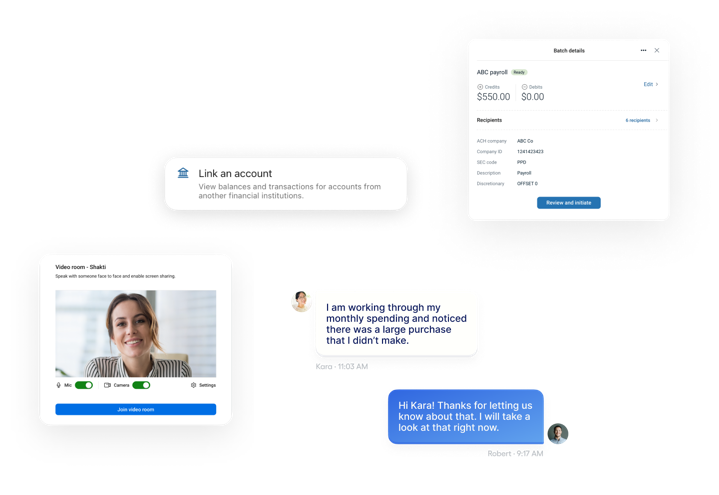
Accelerate issue resolution by initiating video calls directly within Conversations, where agents can utilize secure screen sharing and real-time cursor placement to provide high-touch, human support.
Set an after hours message to appear when you are unavailable. This helps your users know when they can expect a response and you can provide other opportunities for self-service/help.
Provide agents with an instant conversation summary for critical context, drastically cutting down resolution times.
Understand the success of your ads with stats like goal pageviews, first-time visitors, returning visitors, click-through rate and best performing ads.
Users can unblock new devices using a trusted anchor device they’ve already logged into.
Users can easily manage their business payments by reviewing and approving their ACH transfers.
Manage, view and approve wire transfers above a certain threshold.
Upload assets to use on your website and apply labels to make them easy to find later.
Assign a specific conversation to someone within your support staff.
Save your users a trip to your branch. Now your support staff can attach and send a fully authenticated form (i.e. change of address) with just a couple of clicks – and it’s just as easy for the customer to fill out and send right back!
Attach and send a fully authenticated form (i.e. change of address) from your support staff to your users through Conversations.
Users and support team members can attach accounts, transactions, files or photos to provide more context to support sessions.
Allow users and support staff to attach accounts, transactions, files, or photos to provide more context to support sessions.
Business users can attach ACH batches to Conversations, making it easier to provide context for resolving issues and collaborating securely.
Users can easily track their expenses and provide images for their record keeping.
Know if your users are visiting your website from desktop, tablet or mobile devices.
View a historical audit trail of all actions on a user’s account: authentication and password changes, money movements and other high risk actions, and more.
View the changes made to your website and see who is making them.
Create, manage organizations and give entitlements from the back office.
Gain comprehensive insights into your operations with detailed reports on payments, user activity, and transactions.
Effectively communicate important information to users with high-visibility messaging displays.
Replaces hardcoded in-app strings based on the user's device settings.
Access digital banking analytics about your users to make better informed decisions and unlock insights by inputting the data into your reporting tools of choice.
Quickly see who your most engaged bill pay users are, what the average payment amount is, and how much money is being moved through Bill Pay total.
Restrict newly registered devices from performing high-risk actions on user accounts until they are manually unblocked by authorized employees with granted permissions.
Help protect user accounts by preventing unauthorized access during configuration. Set and enforce a score threshold with Mastercard’s NuDetect that will trigger a risk event on suspicious and fraudulent activity right within Banno People's back office.
Receive email notification for new and unread support conversations.
Make sure your site doesn’t have any missing assets—like images, HTML, CSS, and JavaScript—or broken links.
Know that every link on your site will successfully lead your users to where they want to go.
Organize your ads in campaigns for an additional layer of statistics and categorization.
Allow users a simple and secure way to automatically add cards to their digital wallet right from your financial institution’s app.
Users can temporarily freeze their credit card.
Create and attach tags to cases for improved case management and reporting.
Access Prior Day and Current Day reports to streamline reconciliation and manage liquidity, plus a Summary Report for a clear, comprehensive multi-account view.
Make CD management more convenient by letting members see and act on renewal options for eligible certificates and make transfers at maturity.
Ability for users to view, create, and revise off-cycle and automatic loan transfers.
Banno Monitor™ will watch over the content on your website to make sure no unauthorized changes have occurred.
Business users have the ability to chat with their teammates via Conversations for Business.
Banno Monitor™ will make sure you never have expired certificates or unwanted changes to your DNS records or SSL certificates.
Quickly and efficiently handle batches of check exceptions, rather than individually approving or rejecting each check. For credit unions, this is managed via SSO with our third-party, ACH Alert.
Quickly and efficiently handle batches of check exceptions, rather than individually approving or rejecting each check.
Simplify child support disbursement for your employees by creating automated batches and saving templates for recurring payments.
Gain flexibility by placing ads in specific spots across the accountholder dashboard.
Define product functionality, process schedules, access controls, and login preferences.
Set the default order of the cards on a user’s dashboard, and add custom plugin cards.
Powered by Finicity, users can link to their third-party financial accounts to view their balances and recent transactions right within the Banno app.
Understand and automatically update a conversation’s status based on what action is needed by whom.
Initiate, oversee, and ensure the execution of electronic payments or transfers.
Easily create and onboard businesses, add products, configure authentication, and establish billing settings.
Create, manage, and send wires from one bank account to another within the United States.
Initiate, oversee, and ensure the execution of electronic international payments or transfers.
Create, manage and send wires transmitted outside of the United States via SSO with our third-party partner, Corpay.
Create and schedule loan payments, easily review payment history, and approve or reject any pending loan payments.
Create and schedule one-time and recurring transfers, easily build templates, and approve or reject any pending transfers.
Search for, manage, and access user profiles and their associated account details with ease.
Keep control of the content on your site and add or move pages whenever and wherever you need to.
Users can make payments to their JHA Full Service Credit Cards using their checking or savings account.
Export a CSV list of user information for each report type.
Set up real-time alerts via text, email, and in-app push for key events and manage how users receive alerts based on their preferences.
Allow your users to set custom notifications for account balance thresholds, debit and credit transactions on their accounts, and more, via text, email, and in-app push.
Use detailed filters to create custom reports and save them as favorites for easy access later – even right from your dashboard.
Tailor your experience by arranging widgets for quick access to recount activity, transfers, loan payments, exception review, reports, and bank communications.
Easy to organize cards allow your users to decide how to sort their most important information.
Leverage direct links in messages to navigate accountholders to specific in-app features or external applications.
Delete external checking and savings accounts on behalf of your users through Banno People's back office.
Through integrations with EPS Remote Deposit Anywhere, Vertifi, Bluepoint or Digiliti Money, users can deposit checks from their device.
Understand at a glance your institution’s average and daily deposit amount and volume.
View every device a user has logged in from, and remove some or all that are listed. This is a great way to check outdated browser or app user issues.
Securely access the app using biometrics like FaceID or fingerprint recognition, with the device lock as a fallback.
Gain context about your user's support history by viewing previous conversations and managing duplicate messages.
Easily understand incoming and outgoing electronic payments with detailed reports, streamlining reconciliation and cash flow management.
Easily understand incoming ACH transactions with detailed reports, streamlining reconciliation and cash flow management.
Receive email notification for new and unread support conversations.
Get alerts when Banno Monitor™ finds a problem with your site and receive reports as often as you’d like.
Enroll in Bill Pay with both Banno Mobile and Banno Online. All eligible accounts will be enrolled when a user accesses any of the bill pay features.
Keep track of all enrollment attempts, and which users made it through the enrollment process.
Third-party tools can integrate with EES to help mitigate fraud and identify high-risk scenarios, firing alerts when fraud is most likely to occur, such as when a user moves money or connects to a third-party account.
Streamline your bank’s operational processes by reducing manual steps with automated onboarding and workflow templates.
Customize your user’s dashboard and encourage unenrolled users to sign up for eStatements.
Users can view how much their loan payoff will be on a specific date with interest and fees included.
Export transaction data for a range of dates in a variety of formats.
Users can review and understand more about their accounts with additional details.
Generate API keys, manage single sign-on integrations, and configure plugin cards to enable 3rd party functionality.
Users can make payments to their JHA Full Service Credit Cards using external checking or savings accounts.
Set up external transfer accounts with micro-deposit verification. Inbound and outbound transfers can be one-time, future-dated or repeating.
Enables users to securely authenticate and verify their identity using a physical key that can be plugged into their device, providing a simple one-step authentication method.
Sometimes users forget their username or password. Self-service account recovery gets them back in safely.
Allows the flexibility to select from your own date ranges.
Schedule, build ACH templates, and create recurring ACH payments.
Schedule wire transfers for a future date to manage cash flow with ease and eliminate manual payment tasks.
Schedule, build wire templates, and create recurring wires.
Boost engagement and reduce drop-offs by connecting with visitors before they log in, using Conversations built natively into your public site.
Users can hide or show their accounts from within settings.
Hide pages from search engines.
Allow your users to set custom notifications for account balance thresholds to be delivered via text, email, or in-app push.
Users will be required to enter their credentials when initiating an ACH batch considered to be a high-risk payment.
Users will be required to enter their credentials when transmitting a wire considered to be a high-risk payment.
Temporarily freeze funds during transactions for secure payments and ensure accuracy of account information with test transactions, available today for SilverLake customers only.
Quickly update your hours of operation, including holidays hours, to let your users know the best times to contact you.
Use our table editor to manage the tables on your website.
With our interactive maps you can make sure your users can find where you are and where they can access their money with your ATMs.
Create interest-only loan payments directly within the platform, accelerating the payment process and reducing administrative overhead.
Initiate one-time, future-dated or repeating transfers.
Easily give employees access to Banno by sending them an email invite.
Centralized authentication for your employees and enterprise users, paving the way for a seamless back-office SSO experience while ensuring secure access to protected resources.
Access modern reporting and visualization directly within the Jack Henry ecosystem. Feel confident working with data and turn it into actionable insights.
Users can link an external debit card to transfer funds in real-time between eligible accounts.
Allow your users to set custom notifications for debit and credit transactions on their accounts to be delivered via text, email, and in-app push.
Users can see a clear description of how their loan payment is broken down with consolidated transaction views.
Display your branch and ATM locations and allow users to contact you.
If you ever need to make certain changes to your site that would trigger an alert you can schedule a maintenance event to avoid false alarms.
Banno Monitor™ will watch over your site for malware or links to phishing scams.
Set up filters for incoming ACH debits, specify authorized accounts, companies, and transaction amounts to prevent unauthorized activity and enhance security.
Allow users to view all cards on their account, report lost or stolen cards, and manage their alert preferences for individual separate entity credit cards.
Configure feature-level ability permissions on a per-user basis.
Business users can create, edit, delete, and validate routing numbers and financial institutions for each recipient.
Groups are the categories you use to determine which employees have access to support settings, features, applications, and various permissions inside Banno.
Allow admins the ability to bulk-assign Transfers permissions to a specific segment of users.
Create, edit, and store ACH recipients in a list for quick and easy access during future transactions.
Manage all RDC-related settings at the institution level, affecting all users, including which accounts allow RDC.
Manage external and internal transfer settings at the financial institution level—affecting all users.
Verify a user’s 2FA phone number, enrollment setting, reset their 2FA settings, and send users a one-time text or email to have them verify their identity.
Transfer funds to another member of the credit union.
Send messages to all of your users, keeping them up to date with your institution’s news, and gain greater control with the ability to schedule, expire, and send your messages as an in-app push notifications.
Verify authentic accounts with small deposit transfers.
Access key features and securely manage finances, online or offline, for ultimate convenience with our progressive web app (PWA).
Instantly translate conversations in real-time across 50+ languages, providing agents the confidence to serve every accountholder with full accessibility.
Safeguard transactions with customizable approval workflows, defined approval tiers and dollar thresholds.
Gain comprehensive data needed to track accountholder device status, monitor employee unblocking actions, and anchor device verification flows.
View report of users who are enrolled in 2FA, but used a phone number that is not on their core record. This allows you to keep core validation turned off, but still manage the risk by reviewing these users manually.
Lower interest payments by linking loan or credit accounts to an offset account and validate fund authenticity during setup for added assurance.
Once a user logs into your online banking site we’ll associate that username with their browsing habits so you can have a better understanding of who they are and what products they’re interested in.
Let your members open a share whenever it's convenient for them. At the time of opening, members can easily add share holders and fund the new share via transfer or check. Share types include (but are not limited to): Certificate of Deposit, Checking, Club, Savings, Money Market
Users can customize the order in which their accounts display.
Help members out when they’re short on funds. Members can—for an overdraft fee—use their debit card to make ATM withdrawals or transactions, even if they don’t have funds available in the moment.
Send users a one-time text or email with a magic link to set a new password. No temporary passwords here, the user will choose a new password and two-factor authentication (2FA) in their account.
Through our integration with iPay, users can add the bills they want to pay and send funds. Users can also schedule recurring payments and send overnight or second-day payments.
Users can send and receive money through iPay, P2P, or Zelle® with friends and family.
Users can calculate remaining loan life and get a quote for the cost to settle up in the moment – interest and fees included.
Send an overnight or second-day payment via electronic or check.
Users can update their preferred name, photo, username email, phone, address, and password.
Quickly review and decision exceptions, audit issued items, and track all check maintenance activities for oversight.
View a report that will indicate if a user’s password may have been correctly guessed by a credential stuffing attacker. 2FA is still in effect, but the account may warrant some special attention, such as accounts with a 2FA phone number that does not match their core record.
Deliver high-value messages instantly as prominent banner ads on the Dashboard.
Allow certain users to edit your content, and require others to approve the changes before they go live.
View any rate limiting occurring in near real-time. While this chart is helpful during initial implementations, its primary purpose is to allow you to monitor credential stuffing activity. If the chart says “there is no data” then that means no users are getting blocked.
Users can re-order their card to replace an existing debit or credit card.
Stop bots and other malicious attacks while approving valid users on your CMS website forms.
View the customer’s recent transactions to help troubleshoot potential issues.
Allow users to schedule future credit card payments on a specific date each month and specify how much they want to pay (the minimum due, the last statement balance, or the full balance).
Automate regular wire transfers to occur at set frequencies for simplified and scheduled payments.
Create, edit, and delete redirects to get your users to the right location.
See a list of rejected users and enable them if needed.
See data about how many of your users are enrolled in RDC, and who your most active RDC users are.
Easily remove user profile photos that are legally noncompliant, or contain any unacceptable imagery.
Quickly report a lost or stolen debit or credit card.
Create your own custom reports and export them to a CSV file.
Keep track of the forms you collect from your website and archive them when you’re done. You can also export them to a PDF, Excel or CSV file.
Ability to undo design changes or reinstate previous versions of your website pages.
Send ACH files for quick processing, enabling immediate transfers for urgent transactions.
Send ACH files for quick processing, enabling immediate transfers for urgent transactions.
Utilize a custom saved reply or template to answer your most common questions.
Create timely messaging for all users with the ability to schedule, expire, and send as an in-app push notification.
Creation of recurring payments for bill pay and editing of full payment series.
Make changes to your site even if you aren’t ready to publish them and schedule the changes to go live at a later date.
Quickly find who you’re looking for by searching in various ways - by name, email, username, NetTeller® ID, CIF, or member number.
Dynamic search that filters transactions as the user types.
Securely automate Nacha file transmissions with your existing approval workflows.
Securely automate Check Issue file transmissions to minimize manual uploads and maximize efficiency.
Send and receive secure support messages between banks and businesses directly from your dashboard.
Users can securely activate their credit card online.
Require one-time password (OTP) or secure token verification at specific risk points including payment creation, approval, and admin tasks.
Allow users to have a secure conversation with your institution, exchanging messages and documents.
Target a specific group of users with customized marketing and notices, allowing for more tailored messaging and delivering a more efficient, personalized experience.
Accountholders can quickly and securely self-serve to get digital access to their accounts. Add age restrictions to prevent young users from enrolling.
Accountholders can find, fill out, and submit common forms without the need for financial institution staff intervention.
Users can personalize their accounts by giving them unique names.
Users can understand at a glance their accounts’ standing.
Your employees can easily access the Banno Digital Platform from anywhere, right on our website.
Develop and edit your websites templates.
Users can opt to delay their next loan payment on eligible loans – without calling or visiting a branch.
Users can skip a payment on eligible loans at their local credit union.
View and browse your website from any point in time that a scan was run in the past.
Notify accountholders when they’re navigating to an external application.
Users can chat securely with your bank’s support team to get the answers they need, designed to feel like the messaging app they use every day.
Provide access to statements, tax documents, notices and other documents from Jack Henry’s ESI eStatements integration.
Provide access to statements, tax documents, notices, and other documents from ESI, 4|Sight, and InfoImage.
Stop pending checks from being cashed or deposited.
Place stop payments on issued checks to prevent unauthorized debits from an account and easily review stop payment history for complete control.
Allow retail and business users to receive timely notifications for critical money movement activities, such as failed or expiring scheduled transfers.
Quickly start a conversation from a user’s profile.
Unify five Banno-native features to better deliver speed and human connection, transforming service into a compliant growth engine that accelerates scaling.
Suspend user profiles directly within Banno People to manage account access and improve administrative efficiency.
Classify and label deauthorized devices and history events to help identify suspicious and potentially fraudulent activity.
Allow users to easily switch between signed in profiles and get full access to all mobile features for each of their accounts.
Alert users when your institution is experiencing maintenance or other disruptions to their mobile and online banking services.
Users can tag their transactions to make organizing and searching for them easier.
Small and medium business owners can accept debit and credit card payments in real time, all within their native digital banking app.
Set up, process, and save federal and state tax payments for your business.
Users' digital banking apps can automatically categorize transactions and generate more readable names, whether they are for accounts with their financial institution or external accounts.
See who your most engaged transfer users are, the average amount each user transfers from your institution, and how much transfer traffic is being used each day.
Users can tell you when you’re traveling with their cards to help make sure their time away from home is stress-free.
Keep your rates up to date in one place in our CMS, and use our dynamic links to put them on your site in multiple places that will update automatically whenever your rates change.
Help protect employee accounts from unauthorized access by requiring them to enter an additional code when they sign in.
Help protect user accounts from unauthorized access by requiring an additional sign-in code.
Help protect user and employee accounts from unauthorized access by requiring an additional sign-in code.
Allows users to have a single set of login credentials across multiple platforms while supporting two-factor authentication (2FA) and additional authenticator products like FIDO tokens and Google Authenticator.
Reset your user accounts through Banno People’s back office and easily allow them access to their account.
Prevent check fraud by electronically sharing check information with the bank or by entering each check’s information manually, allowing the bank to check for any errors. For credit unions, this is managed via SSO with our third-party, ACH Alert.
Prevent check fraud by electronically sharing check information with the bank or by entering each check’s information manually, allowing the bank to check for any errors.
View and download a CSV file of all changes made to an organization user.
Grant users specific permissions and entitle them to perform a variety of tasks based on their role.
Easily connect user data across systems with exportable identifiers like username and ID.
Pull in customer information directly from the CIF.
Understand at a glance how many users are engaged with your online banking, how often they’re coming back, which platforms they’re using, which external institution accounts they’re using, what time of day they’re visiting, who’s visiting for the first time, and more.
Send user a one-time text or email to have them verify their identity.
View the same accounts, transactions, messages, notifications, and all other account-related information your users see.
Detect if a user is locked out, needs their password reset, or is dormant, and help reset their password or account as a whole to regain access.
Balance and summary information for DDA/share, credit, and loan accounts.
View check images in Online, iOS and Android from in-branch, ATM or RDC deposits.
Users can see holds on previous payments to understand their current and available balances in their accounts.
Users can see when your institution is available to help.
View the user’s recent messages and alert notifications to see communications they have recently received.
User photos provide an opportunity for a more personal support conversation.
Enforce core-level restrictions in digital banking to control member’s access, limits, and account activity.
Our WYSIWYG editor makes it easy for anyone to update your website.
Create and save recipients to a list for immediate and future use, making transfers with ease.
Simplify business payments by saving a wire as a template for future use.
Users can define minimum and maximum amounts to withdraw funds by check and deposit them into another account, making it easier to close an account or make transfers from inaccessible accounts.
Let's discuss your ideas.